Understanding YANG: The Language for Network Automation
October 30, 2025 • Network Automation

A beginner-friendly guide explaining what YANG models are, why they're essential for modern network automation, and how they work with tools like NETCONF and RESTCONF.
Introduction
Modern networks are growing larger and more complex, making manual management impractical. Network automation has become essential for saving time, reducing errors, and maintaining smooth operations. However, to automate effectively, we need a clear and structured way to represent device configurations. This is where YANG models come in.
In this post, I'll explain what YANG models are, why they matter, and how they're used with protocols like NETCONF and RESTCONF. By the end, you'll understand the basics well enough to start exploring network automation on your own.
What is YANG?
YANG (Yet Another Next Generation) is a data modeling language used in networking. In simple terms, it provides a standard way to describe how configuration and state data should be structured on network devices. Instead of each device using its own format, YANG creates a clear, consistent structure for everyone to follow.
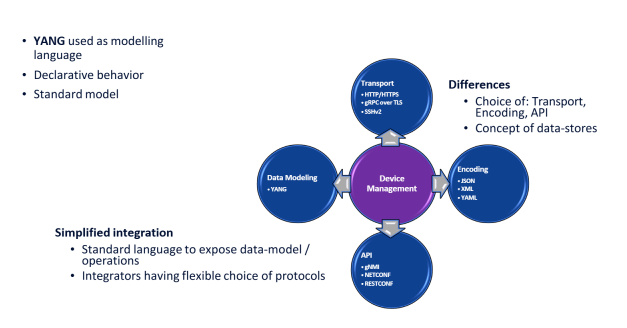
In a nutshell, YANG is a language used to describe the data models of network devices.
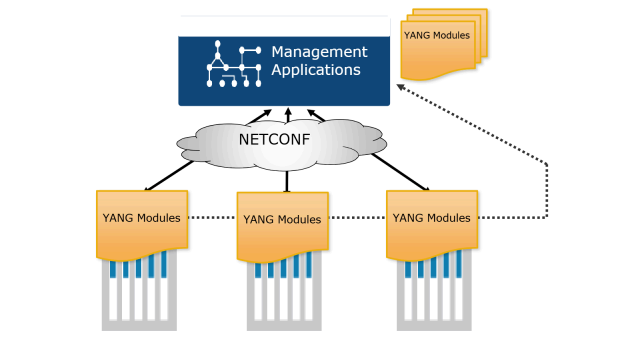
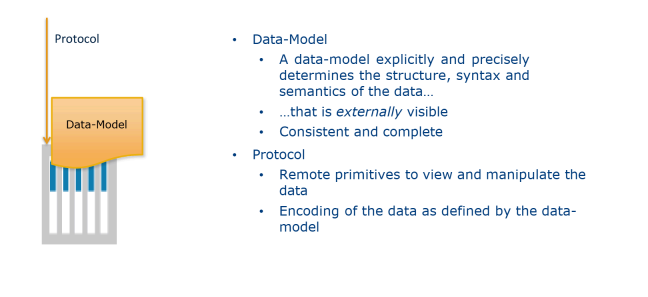
These models are used by automation protocols like NETCONF, RESTCONF, and gNMI to read and manage device settings consistently. Because of this, YANG plays a central role in modern network automation.
To learn more about YANG, consider YANG for NSO.
Why YANG Models Matter
YANG models are crucial in network automation because they bring order and consistency to device configuration. Instead of every vendor using a different format, YANG provides a common structure that works across various platforms. This makes automation much easier, as tools can understand and work with a predictable layout.
YANG models are designed with programmability in mind. When devices follow YANG models, scripts and automation tools can read, modify, and push configurations without guessing or dealing with messy differences. This reduces human errors and cuts down on mistakes that often happen when configurations are typed manually.
Overall, YANG models make networks easier to manage, automate, and scale.
Key Components of YANG
YANG models are built from several basic building blocks that help organize configuration data clearly. Before we see them in practice, let's get familiar with the keywords present in YANG models:
- Module: This is the main file that holds your entire YANG model. Think of it as the "package" for everything inside.
- Container: Used to group related data together. For example, all interface settings can be placed inside one container.
- Leaf: A single piece of information, like a hostname, IP address, or MTU value. Leaves store actual configuration or state data.
- List: A repeating set of similar items. A good example is an interface list—because a device can have many interfaces, each becomes an entry in the list.
- Typedef: Lets you create custom data types that can be reused across your model, making things cleaner and more consistent.
- RPC / Action: These define operations the device can perform through automation tools, such as resetting an interface or triggering a test.
You can picture it like a simple hierarchy: module → container → list/leaf, showing how data is structured in a clear and organized way.
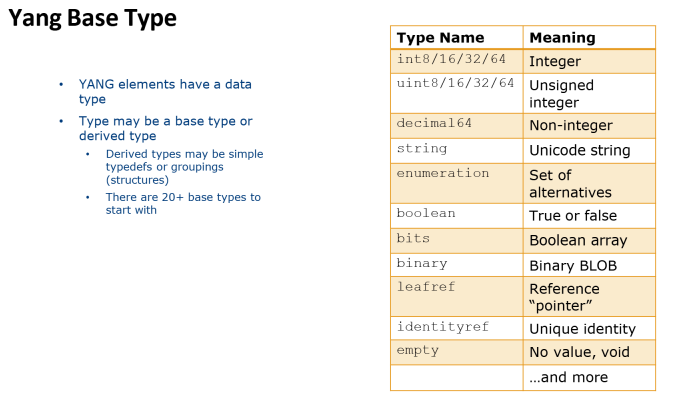
It's also important to familiarize yourself with the data types supported in YANG.
A Real-World YANG Example
We will analyze the IETF Interfaces YANG Model. This file is a standard YANG model created by the IETF. Its purpose is to describe how network devices should represent interfaces (like Ethernet0, Loopback0, VLANs, etc.) in a structured, machine-readable way.
This model is used by NETCONF, RESTCONF, and other automation tools.
A Quick Explanation of the YANG Structure
The Main Container: interfaces
This is where you configure interfaces. Inside it is an interface list, where each actual interface you configure is an entry.
Each interface has:
- name → The interface name (e.g., GigabitEthernet0/0).
- description → Human-readable text about the interface.
- type → The type of interface (Ethernet, loopback, etc.).
- enabled → The administrative state (up or down).
The Second Container: interfaces-state (Operational / Read-Only)
Note: Read-only means you cannot edit this data; it shows real-time status.
This container shows live interface information, including:
- The actual interface name.
- admin-status (administratively up/down).
- oper-status (operationally up/down/testing/unknown).
- When the interface last changed state.
Typedefs (Custom Types)
Typedefs allow the model to define custom data types for reuse. For example, a tunnel-type might be defined to ensure only valid tunnel options are used.
Identity (Interface Type Identifiers)
Identities are used to create a hierarchy of interface types. For example, an identity interface-type can have children like ethernet, loopback, and tunnel. This ensures interface types are consistent and extensible.
Parsing a YANG Model
Reading a raw YANG file can be challenging. Network engineers often use tools to parse and visualize the model, making it easier to understand. One popular tool is pyang. You can install it using pip install pyang.
Let's look at an example of a parsed YANG model:
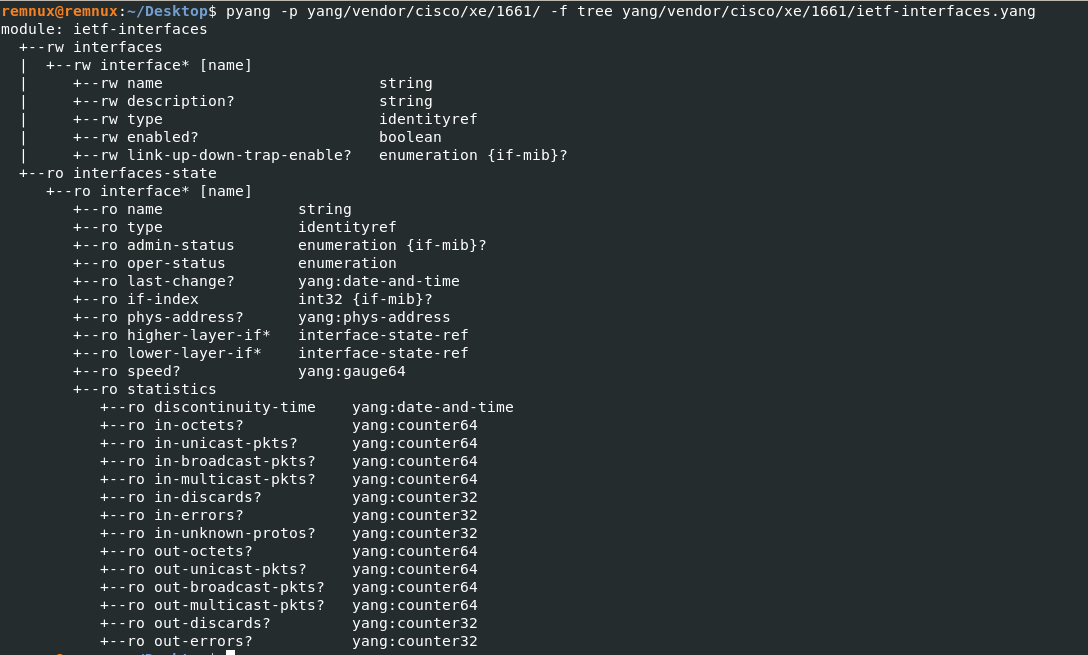
Now it's much clearer! In the output:
- ro → Read Only
- rw → Read and Write
By parsing the YANG file, you can see and understand the structure very well.
Seeing YANG in Action: A Lab Example
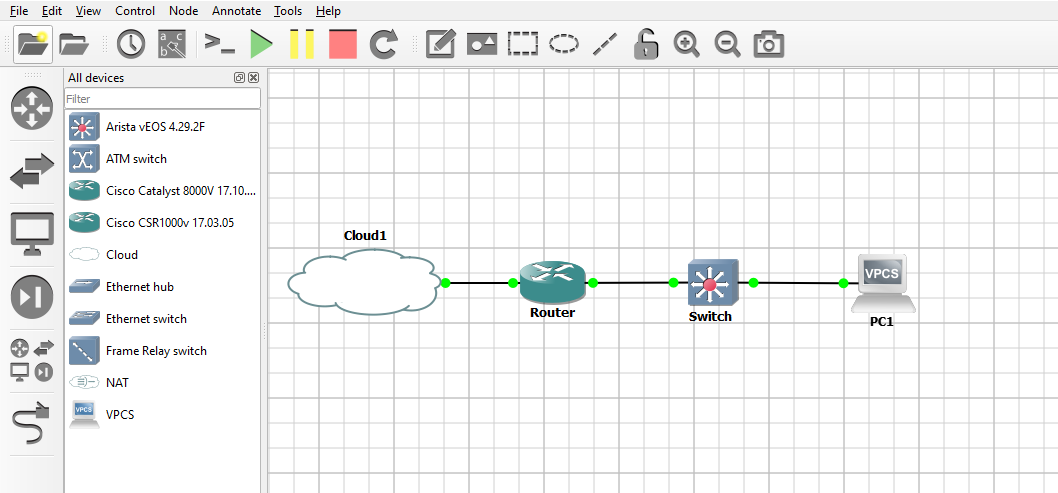
I built a small lab topology using GNS3 to demonstrate router configuration. We'll retrieve the interfaces and see how their structure matches the YANG model we discussed.
I used Postman to retrieve the interfaces via RESTCONF:
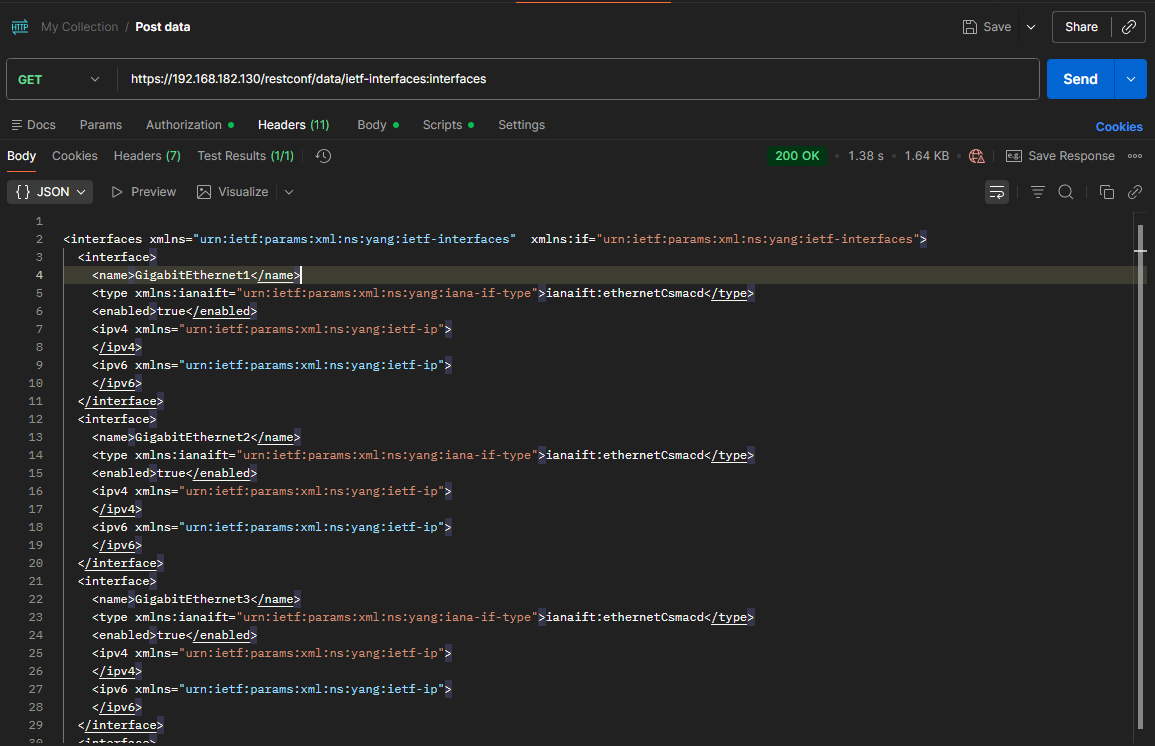
Note: I retrieved only the interface names and some basic information to see the structure. Here's a snippet of the XML response:
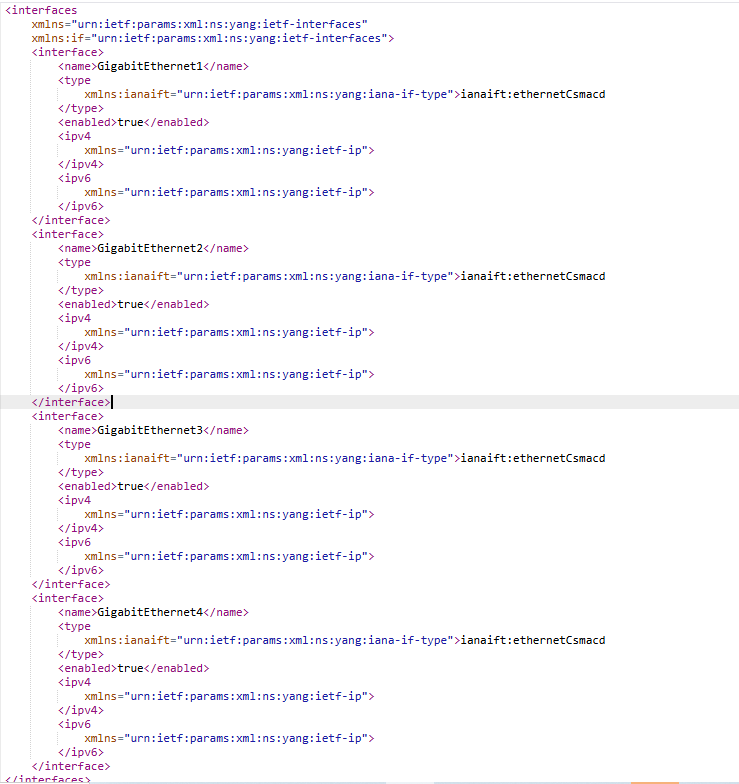
To understand this better, let's compare the parsed YANG structure with the actual XML data:
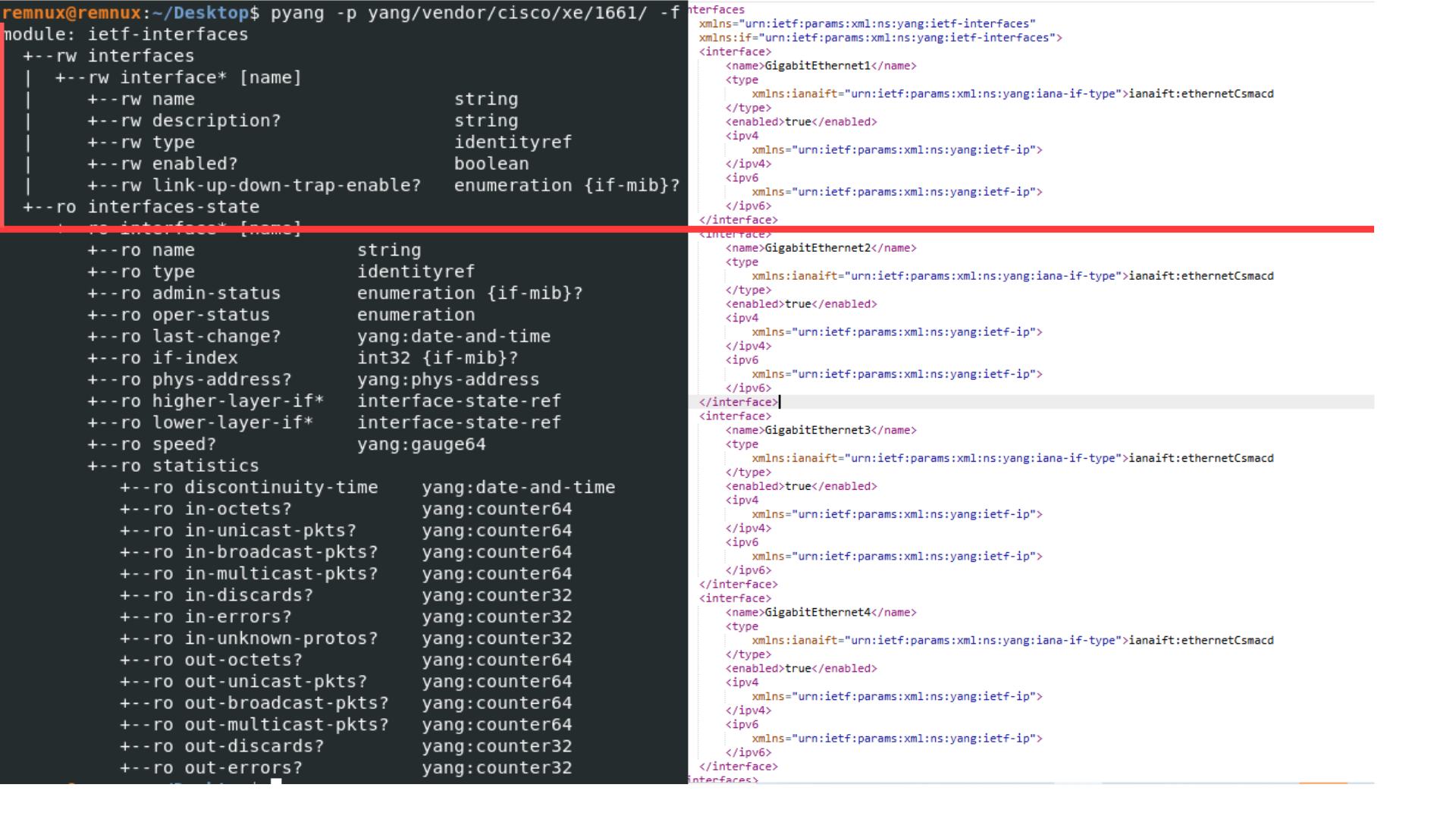
Now you can see how the YANG model translates into real configuration data.
Note: You might notice that not all details from the raw YANG model appear in our initial XML. That's because I used
GET https://192.168.182.130/restconf/data/ietf-interfaces:interfaces, which shows only the list of interfaces. If I usedGET https://192.168.182.130/restconf/data/ietf-interfaces:interfaces-state, it would give more operational details.
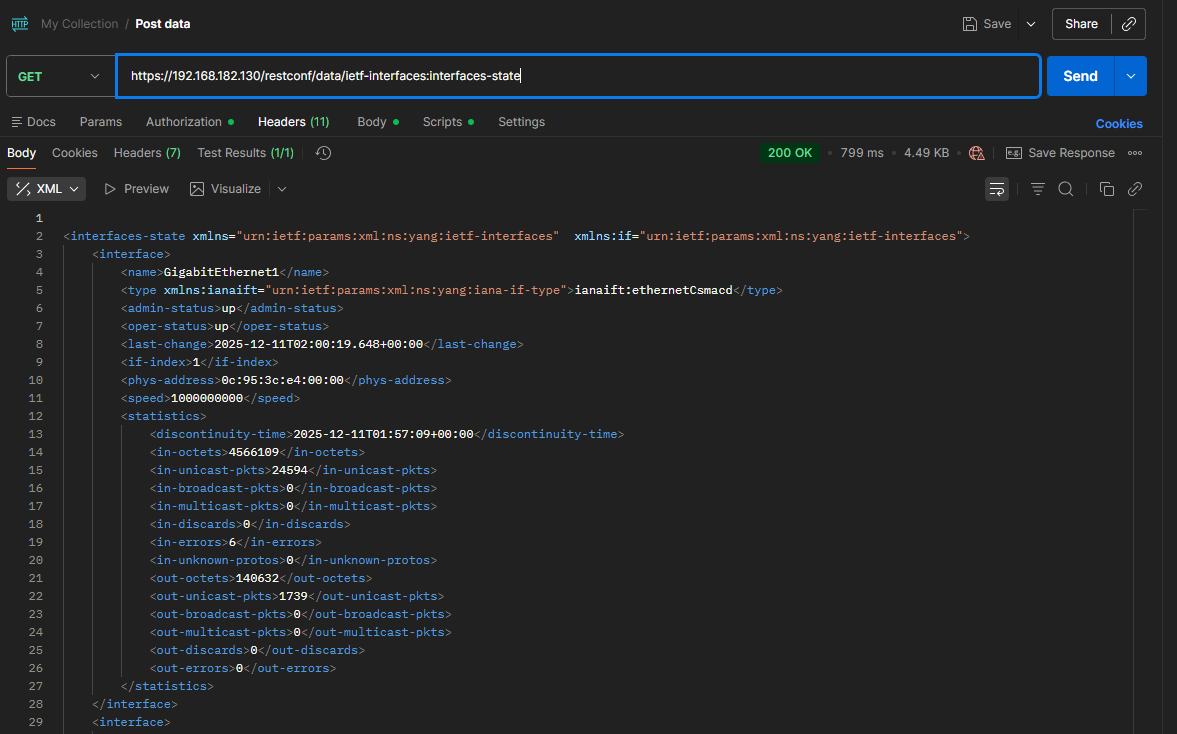
interfaces-state
That's the basic idea! Later, we can explore how to automate configurations in the lab.
How to Start Learning Network Automation
If you're wondering how to get started with network automation, here are some excellent resources:
Free Courses & Videos
DevNet Resources
- DevNet Home Page
- Network Programmability Basics (NETCONF, RESTCONF, YANG)
- Learning Labs on NETCONF, RESTCONF, and YANG
- NETCONF/RESTCONF/YANG Information
- Coding Fundamentals Learning Module
- Network Programmability Basics Video Course
GNS3 Playlist